Waking up to dozens of unread group chat messages, buried event plans, and a wall of digital noise has become an almost universal ritual of modern online life. When active conversations explode overnight, spending your morning scrolling through hundreds of stray texts just to piece together critical context creates immediate cognitive fatigue. To tackle this pervasive notification debt, WhatsApp rolled out a major suite of updates on October 29, 2026, specifically tailored to help users pick up right where they left off without feeling overwhelmed.
End the Expiration Date on Crucial Details (Pin Messages Indefinitely)
Few things disrupt a group’s momentum like the constant cycle of re-asking for basic information. Whether it’s an event address, a potluck checklist, or arrival instructions, crucial details tend to get swallowed by the flow of incoming chatter. WhatsApp addresses this persistent friction by upgrading its message pinning capabilities, allowing users to keep essential messages pinned indefinitely at the top of the thread without selecting an arbitrary expiration window up front.
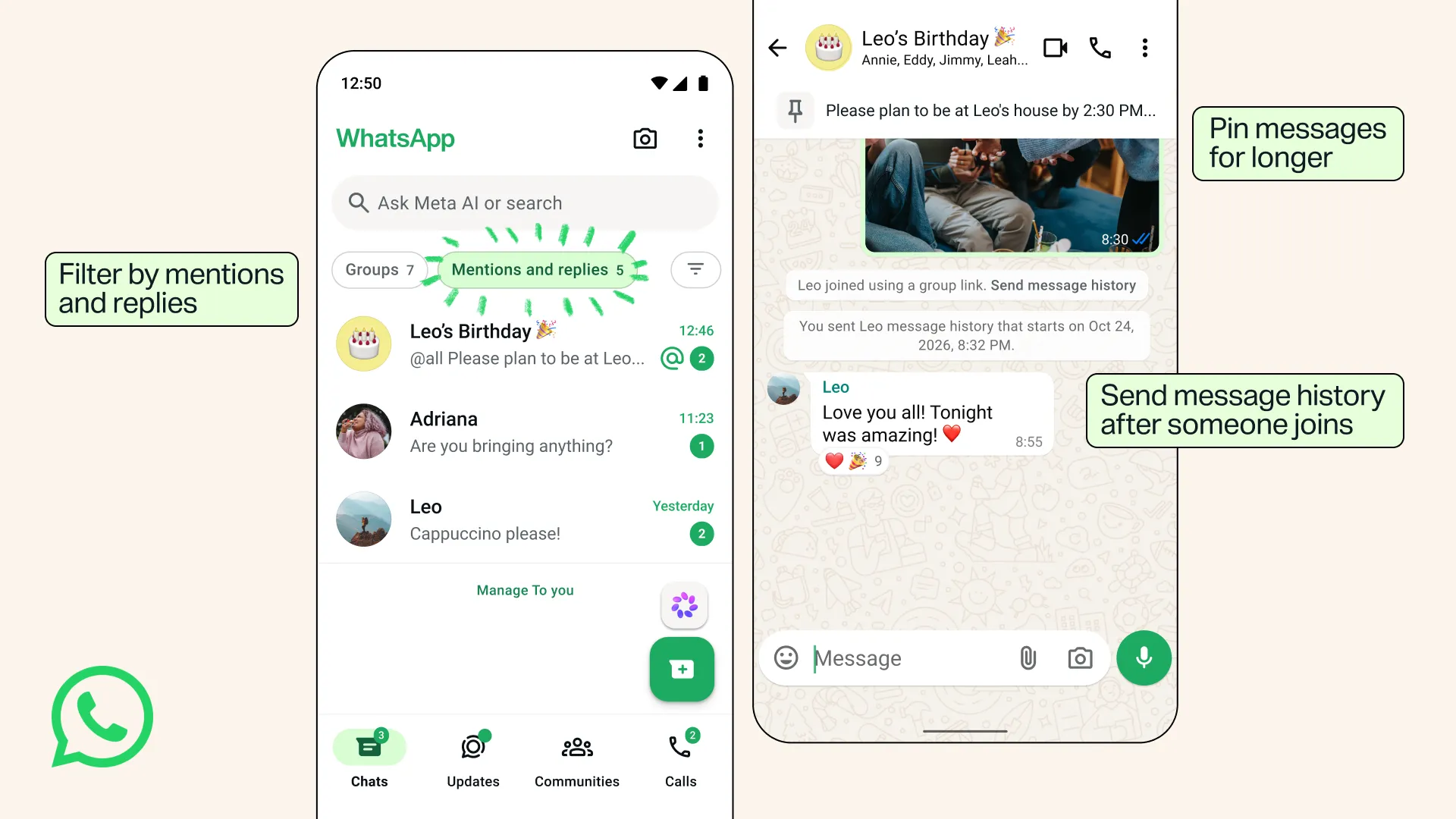
In practice, this turns the chat banner into a persistent bulletin board for your group’s single source of truth. As seen in the app's updated interface, a key reminder—such as "Please plan to be at Leo's house by 2:30 PM..."—remains anchored right below the header bar for instant reference. By removing forced time limits, groups no longer need to repeatedly re-pin important directives or force members to manually dig through historical media attachments.
Onboard New Members Instantly with Retroactive Context
Bringing latecomers into an active group chat traditionally triggered a clunky ritual: re-explaining running jokes, copying and pasting previous itineraries, or leaving the new arrival entirely in the dark. WhatsApp has streamlined this onboarding process by giving users the ability to share recent chat history directly when inviting someone, toggling the option on or off as needed. Even if someone joins through a shared link, the app displays a handy quick-action banner reading "Send message history", allowing you to catch them up in a single tap.
This contextual bridge can also be activated retroactively at any point after a member has joined simply by tapping their name inside the conversation. The app confirms the action with a clear system timestamp in the chat log—for example, "You sent Leo message history that starts on Oct 24, 2026, 8:32 PM." Importantly for privacy-conscious users, this shared history remains fully end-to-end encrypted, preserving WhatsApp's core security architecture while completely eliminating the awkward "catching up" phase.
Hyper-Targeted Sharing via Group-Only Statuses
Social messaging often suffers from an all-or-nothing broadcast problem, where updates meant for close friends accidentally spill over to professional acquaintances or family members. The new Group Status feature solves this by enabling ephemeral, 24-hour status updates designed exclusively for specific group circles, where every member can view, react, and contribute their own updates to a shared story thread.
"Share the right moments with the right people – because what goes in the running club chat might not belong in the family chat."
This change reinstates context-aware privacy to personal sharing. Instead of filtering status updates through complex global privacy settings, you can now post targeted moments directly into the micro-community that actually cares about them—keeping your casual running updates inside the running chat and off your extended network's radar.
Cut Through the Noise with the 'Mentions and Replies' Filter
For users who manage multiple bustling group threads, separating actionable callouts from general banter can feel like a full-time job. To solve this, WhatsApp has introduced a dedicated "Mentions and replies" filter at the top of the main chat list. Displayed prominently as a pill filter right next to "Groups," this view instantly isolates unread threads containing direct tags, inline replies, or broad @all announcements.
Visual indicators make sorting effortless: unread counter badges (such as Mentions and replies 5) highlight high-priority threads, while prominent green @ symbols immediately flag direct callouts. By filtering out general background noise, this tool shifts your attention from message volume to personal relevance, letting you address urgent questions and project dependencies immediately.
Bonus Power User Tips: Three Built-In Tools You Might Have Missed
Beyond these flagship updates, WhatsApp includes several established utility features that help maintain order across active group channels:
- Private Replies: You can reply privately to a single person within a group context, letting side discussions unfold cleanly without clogging the main chat feed.
- Definitive Polls: When rapid decision-making is essential, disable the "allow multiple answers" setting while creating a poll to force clear, single-choice consensus from the group.
- Custom Member Tags: In large or unfamiliar community groups, member tags let you add contextual labels under your profile (such as "Sam's Dad" in a parent-teacher group or "Treasurer" in a volunteer group) so everyone immediately understands your role.
The Future of Frictionless Communication
Taken together, these cohesive updates mark a significant step in WhatsApp's evolution, transforming it from a raw, reactive messaging stream into a structured, user-centric community hub. By pairing persistent reference points with retroactive context sharing and high-signal filtering, staying engaged with your communities no longer requires surrendering your focus to constant notification noise.
Which of these new features will rescue your busiest group chat first?
Comments
Post a Comment